Showing posts with label Tips. Show all posts

Friday, January 6, 2012

How to Make Blog Fast and Faster

Make Blog Faster
Hi, friends! Advance, I've posted about a trick to solve How to Make Blog Fast. That's Boost Blog Speed with CSS Compressor. But, now I will discuss some problems to make blog faster. Who don't want their blog become light, surely all of bloggers want it because our visitors can browse our blog easier.

Based on my experience, there are some tricks to make blog fast :

  • Picture
  • Did you know, pictures with large size can make our blog become slower. So, it's better for you to decrease the use large-size picture. Both in template and also posts. You can use Photoshop Save for Web & Device trick.
  • Widget
  • Over usage widget was one of problems which makes blog become slower. Especially if the widget contains heavy scripts. It's good for you to delete some widgets which unuseful such as clock, music player, pet, games, and so on. Use useful widget such as related posts, most popular articles, or maybe Google Friend Connect.
  • CSS and Javascript
  • As we knew, CSS and javascipt can make our blog become good looking. But the side effect is it can make our blog become slowly. So you should decrease the usage or compress it for your blog. To compress Javascript, you can use Javascript Compressor.

Epilog How to Make Blog Fast and Faster: I think good blog should have a good looking and fast loading. But, don't reduce your creativity on blog. Stay blogging!

Saturday, December 17, 2011

Best CPM for Alternative Online Earning

Alternative Earning
Hi, Bloggers! Have you tried Internet Marketing? What kind of internet marketing did you use? Pay per Click, Paid to Affiliate, Paid to Review, or maybe CPM? No matter what did we use, the main is our earning, right?

One of the easiest internet marketing is CPM. CPM or Cost per Millions is advertising network which paid us (As a publisher) per 1000 impressions in our blog which have been installed the CPM ads. CPM is good for you who want to get dollar from internet with blog easily. Especially the blog has a high traffic, so you can get more dollar a day.

Now, Full Blog Tricks will share for you some Best CPM for Alternative Online Earning.

  • BlueAdvertise
  • BlueAdvertise or DEX Platform is a standardized direct banner media exchange platform for publishers.  BlueAdvertise helps to monetize publisher's websites, blogs , cms's and social websites with network CPM ads.  BlueAdvertise is an easy to use platform that accepts many international publisher.

  • Smowtion
  • Smowtion is a technology company specializing in the Ad-Network business. Smowtion is focused on developing products and solutions for the online advertising industry, helping them to target quality audiences. Smowtion also works with over 150,000 publishers worldwide, using the same optimization processes to help them obtain a higher eCPM and present visitors the most appropriate ads.

  • Tribal Fusion
  • Tribal Fusion is a digital marketing solutions company that drives superior results at all levels of the purchase funnel.  Tribal Fusion is built around dedicated vertical teams that leverage their industry-specific knowledge of “what works” to create fully customized advertising solutions to help companies capitalize on opportunities at every level of the consumer decision process.

3 best CPM above are based on my observation from friends and some blogs reviews. Actually the main things of CPM are TOTAL TRAFFIC and TRAFFIC SOURCE (Country). Because the price of 1000 visitors from US and 1000 traffic from Indonesia are different. So try to get more traffic from US, because the best CPM earning is from US.

OK, I think enough here for this best CPM article. Hopefully this tips are useful for you. Good luck and have a nice day!

Thursday, December 8, 2011

Blogger Free Images Hosting Tip

Blogger Free Images Hosting
Hi, guys! Usually when we have a TLD (Top Level Domain) and use paid hosting, we will save any files into our hosting. Whereas, the hosting has limited place. So, we have to spare place by limit the uploading some files such as picture, script, CSS, etc. But, I think tha's not true. Because it can limit our creativity in blogging activity. So, how to solve it?

You can save your picture files in a free hosting such as Blogger. Wait, How? Use Blogger as a free image hosting? Yups, that's correct. In Blogger Free Images Hosting Tip, I will share to you how to use Blogger free images hosting.

1. Create a static pages at [Posting --> Edit Pages --> New Page]
2. Upload your images normally at this page
3. Then after your images have been finished in upload, right-click your mouse. Choose "Copy link address"
4. Hoopla! You've gotten the image link. You can paste the link address wherever you want.

NOTE: DON'T "PUBLISH" THIS PAGE, JUST "SAVE" IF YOU'VE FINISHED

So easy right to practice Blogger Free Images Hosting Tip. Hopefully this tips are useful for you...

Wednesday, December 7, 2011

Buy Super Cheap Domain for 99 Cent

Buy cheap domain
Hi, Bloggers! Nice to meet you again! Previously, I've posted about 10 Secret Tips To Get High Traffic. Now I will share a tips, that's Buy Super Cheap Domain for 99 Cent. Yes, you can buy super cheap domain now on Domain.com. So, how to buy super cheap domain? Just follow me!

1. Go to Domain.com fanspage on Facebook
2. Then, click the facebook like button.
3. After that, click on "Authorize to see friends who are fans"
4. Fill your email in the 3rd steps.
5. Click "Get a Coupon"

After recommended 4 friends to register on Domain.com, you can buy super cheap domain. The domains which allowed to buy by this coupon are

  • .com
  • .net
  • .org
  • .biz
  • .us

The domain age which registered by this coupon is only 1 year. So if you bought a domain from this tricks, you must extend your domain at the next year with normal price. What are you waiting for now?

THIS PROMO DIDN'T LAST LONG, LET'S BUY SUPER CHEAP DOMAIN NOW!

Thursday, June 23, 2011

Fastest and Easiest Way to Build Navigation Menu

Hi, Bloggers! Now, we're gonna try novelty. That's the fastest and easiest way to build navigation menu. How? We just use CSS Menu Generator. I think, it's very useful software for the beginners. Btw, why I said the software is easiest and the fastest?
Easiest : Because we will use software, so we won't modify the code one by one
Fastest : The code will be display directly after we set its navigation
This software has 3 basic featres. So, what's the features of CSS Menu Generator?

  • HorizontalMenu
  • Vertical Menu
  • Dropdown Menu

Below is the screenshot of CSS Menu Generator


So, what are you waiting for? Just dowonload this software. Click the link


How to add into blogger? Just:
1. Log in to your blogger account
2. Go to Design --> Page Elements --> Add Gadget
3. Choose "HTML/Java Script"
4. Get the code, and add it
5. Click SAVE

OK, that's all friend. Hopefully useful... ^_^

Saturday, June 11, 2011

Easier and Faster to Edit Blogger Favicon

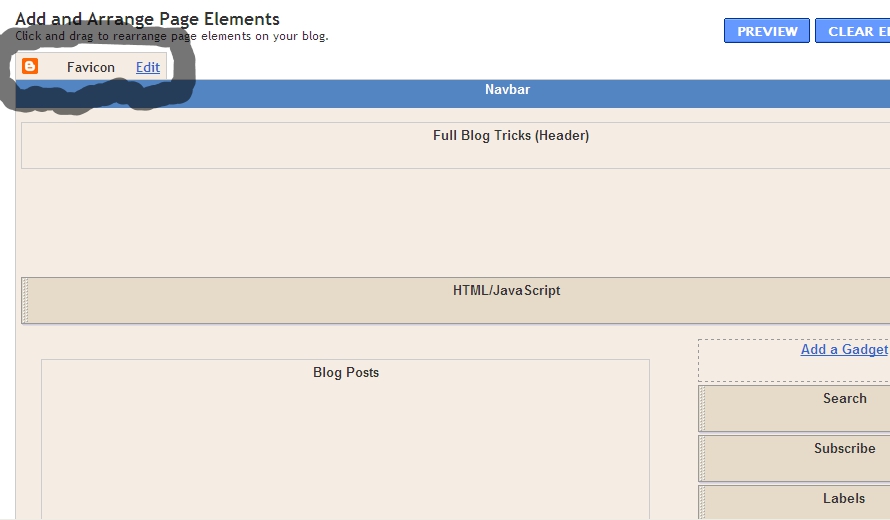
Hi, friends! Did you know? Blogger just release a new feature. What is that? Favicon Editor! Yups.. the function is for Easier and Faster to Edit Blogger Favicon. I think it's very nice feature. We just need little steps to edit our blog favicon. But, where is Favicon Editor place? You can find on Design --> Page Elements.


Then, how to add the favicon? You just click "Edit" on Favicon menu. The, you can upload you favicon file (a file with .ico). Just share some tips, you can get a file with .ico in http://www.favicongenerator.com/. Firstly, upload you picture, and FaviconGenerator will be generate into .ico. So, we just waiting what is Blogger next update...

Thursday, May 26, 2011

1, 2 Award for Full Blog Tricks

Hmmmm.... Didn't feel has been more than 6 months, this blog is created. We have posted more than 100 blogger tricks, hacks, and widgets. Even SEO tips. There have been many comments to Full Blog Tricks. Thank you to all of commentators. Their comments are very useful. Has become a habbit of blogger to give award to other blog. And there are some blog which gave us an award. This is 1, 2 Award for Full Blog Tricks. They are:

Best Friend Award
From: Acernoval


Top Commentator Award


Once again, thank you for all Full Blog Tricks readers. Without you, We are nothing....

Sunday, April 24, 2011

How to Spy Another Blog

Did you ever think, How many visitors are my friend's blog a day? Whereas, your friend's blog isn't using visitor counter such as hitstats, geocounter, etc. But, now you can spy your friend's blog by using CheckSiteTraffic.com. This website give you chance to spy your friend's blogs as many you want. Still in this website, you can spy some informations about a blog such as:
  • Website Title
  • Website Description
  • Categories
  • Traffic Data
  • Alexa Rank Trend
  • Google Trend
  • Server Information
  • Server Physical Location
  • Contact Information
  • Whois Domain Information
So many right? Now, if you want to know How to Spy Another Blog, just follow the steps below

1. Go to CheckSiteTraffic.com
2. Enter a blog address, and click Spy!
3. Then you can see the blog informations

OK, that's all friends... Hopefully useful....

Tuesday, April 12, 2011

Top 3 Paid to Affiliate Websites

As we know, now blog not only for online diary. But, blog can be place to make money online. There are many kinds of online bussiness, for example  Pay per Click (PPC), Paid to Review (PTR), Paid to Affiliate (PTA), and so on. As the name, in PTA you can earn much money by become an affiliate (member of an affiliate program) and "sell" a product or other services to your blog visitors. Then if your blog visitors make a purchase, you will get a certain amount of commission. The commission is 4% to 15% from the purchase. So, if your visitor buy a MP3 for $500, you can earn up to $75 from one purchase! So, it's easy right? If you want know the websites that provide affliate program, I wil give you the list of Top 3 Paid to Affiliate Websites.

  • Amazon Associates
    Amazon give you chance for you to be an affiliate and promote some products and services in Amazon.com in your blog. The products of Amazone are books, e-books, games, MP3, etc.

  • ClickBank
    ClickBank is the biggest "market" of online digital products and you can promote thousands of popular digital products everyday. If you become an affiliate in ClicBank, you can connect your blog topics with ClickBank products, and you will get many advantages.

  • Commission Junction
    Commission Junction give you chance to maximize your blog to be an affiliate and "sell" Commission Junction products on your blog. With diverse product choices, you can choose your own products that you want to promote on your blog.

In affiliate program, you should have a skill to convince your visitors to buy the product from you. So, you should talk smartly with your blog visitors.

Saturday, April 9, 2011

Boost Blog Speed with CSS Compressor

Maybe, blog speed is one of important thing on blog performance. Because if our blog speed too slow, our visitors will be bored. So, we have to use little CSS. But, if our blog requires us to use many CSS caused by the visitors want to our blog looks cool? So, we must use many CSS that will effect to our blog to be heavy. The solution is you must use CSS Compressor. The function of CSS Compressor is to compress our blog CSS, so the CSS will ease. Then, how to boost blog speed with CSS compressor?

1. Log in to your blogger account
2. Go to Design --> Edit HTML
3. Highlight all css code start from <b:skin><![CDATA[/* between ]]></b:skin>
4. Then, add it into CSS Compressor
  • You can setting the Compression Mode and Compression Options
5. Click Compress
6. Select all the new CSS (compressed), and replace with old CSS (before compressed)
7. Just click SAVE TEMPLATE

What is Google URL Shortener?

Maybe many of you don't know, what is Google URL Shortener? As its name, Google URL Shortener is a website to shorter our URL. Actually, there are many websites that provide URL shortener, for example:

  • adf.ly
  • tinyurl.com
  • bit.ly
  • ls.gd
  • j.mp

The websites above are popular websites (URL Shortener), but if you know more, that's better. Then how to use Google URL Shortener?

1. Go to goo.gl
2. Enter your blog or post url, and click "Shorten" like this


3. Then, you ca take the new URL, and you can start to share with this URL

Hopefully useful....

Thursday, March 31, 2011

Top 5 Paid to Review Websites

Do you know, what is Paid to Review (PTR). PTR is a kind of making money online. The rule is very easy, you only write an article based on the advertiser order, then the advertiser will measure your article and you will get money. Easy right? So, I think, Paid to Review is the best way to make money online. How not? Only by wrote on our blog that based advertisers order, we can get $5-$500 per post!

Usually PTR websites use PayPal. Why? Because, you can transfer your money to local bank easily. Actually, there are many PTR websites with different fee. So, I will share to you about, top 5 paid to review websites.

  • www.reviewme.com
  • www.blogsvertise.com
  • www.sponsoredreviews.com
  • www.buyblogreviews.com
  • www.lodlaunch.com

OK, that' all friends! Just grab your keyboard and earn much money!

Wednesday, March 23, 2011

Blogger Release New Version Interface ?

Hi, Bloggers? Do you know, Blogger release new version interface ? Actually some steps had begun little by little since 2010.  Do you not realize it? Start from Template Designer, Real-time Stats, Spam Filter. And now in 2011, Blogger will make bigger changes. They will release the new version interface . Let's watch the video below.


Blogger said in the official blog.
The new design is not only cleaner and more modern, but it also uses Google Web Toolkit, delivering the latest in web technology.
So, we're really hope, blogger can release the stylish but with more less time loading too. If, you want to know some changes. Let's see the screenshot below.

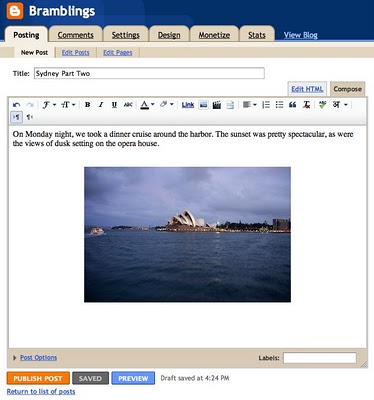
Current Post Editor


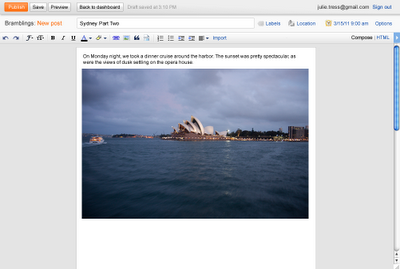
New Version


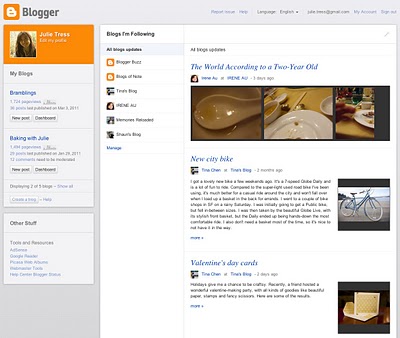
Current Dashboard


New Version


New Blogger Navbar

So, we just wait. What blogger team do for the new version interface.

Saturday, January 22, 2011

50 Important Blogging Tips


As a human, we must have a principle. Because with the principle, our life will be discipline and focus. As well a blogger, we must have a principle to develop our blog. So in this case, I will share to you about some blogging tips. There are 50 Important Blogging Tips that I will tell to you.

1. Create a new blog
2. Write your favorite topic
3. Choose a topic wisely
4. Use a domain that consistent with your blog's topic
5. Try to make a memorable domain
6. If you want to serious, buy a domain
7. Make a good design (template)
8. Choose appropriate widgets with your blog
9. Don't put too many widgets on the sidebar
10. Use easy-to-read text
11. Write a post with effective title
12. Put at least one picture in a post
13. Give some jokes
14. Don't copy articles from other blogs
15. Read again your post before publish
16. Edit the post more than one
17. Set the category or the label
18. Write at least 5 posts a week
19. Ping to Pingomatic and Pingoat after post
20. Write for Technorati and Ezine Articles
21. Blogwalking
22. Interact with other bloggers
23. Participate in the other bloggers project
24. Leave a useful comment
25. Become the first commentator
26. Try to always answer comments
27. Learn basics SEO
28. Use Meta Tag
29. Submit your blog to  Google, Yahoo!, and Bing
30. Register to some Social Bookmarks
31. Register to some Directories
32. Use Google Webmaster Tools
33. Use Google Analytics
34. Use Google External Keyword Tool
35. Create a list of "The Most Popular Posts"
36. Create a list of " Recent Comments"
37. Give some useful tools
38. Give some useful links
39. Use RSS Feed
40. Provide an easy way to subscribe
41. Join in some forums
42. Put a link to our blog as a signature
43. Provide an easy way for visitors to contact us
44. Try to earn money with Google AdSense, AdBrite, or Chitika
45. Don't put too many advertisements
46. Set the advertisement wisely
47. Blogging consistenly
48. Be patient
49. Be yourself
50. Make a list of "50 Important Blogging Tips" 

I think if you can do all 50 Important Blogging Tips, you will be a "Real Blogger".

Friday, January 21, 2011

10 Secret Tips To Get High Traffic

When we've made a blog, usually we will complain about our blog, "Why my blog only has a low traffic?". In this case, you have to be patient first, because that's normal. Do you know, after one week I made this blog, my blog only visited by 4 person per day! Then, I pomote my blog to Facebook and submit my blog to some search engines. You can also advertise your blog in a free advertising website. Then, the result is my blog has a good traffic! If we has a good traffic, that's same as has a good rank in Alexa (Alexa Rank). Now, I will share to you about 10 Secret Tips To Get High Traffic.

1. Update your blog frequently
If you update your blog frequently, visitors will also visit your blog everyday. And search engine robots also visit your blog more often.

2. Make a good and unique post
The quality of post is the first! It's important to build traffic. When your visitors like your blog, maybe they will become your subscribers or loyal readers, and then they will tell your blog to their friends, so your blog become popular without spend your money to advertise.

3. Blogwalking and leave a comment in other blogs
Although it seems unimportant, blogwalking and leave some comments in other blog can give you good traffic. Because when you leave a good comment, other visitor or the webmaster maybe click your name, and go to your blog.

                                                      4. Submit your blog to Search Engine

By submitting your blog to some Search Engines, your blog will be indexed quickly. Search Engine that you should submit are Google, Yahoo!, and Bing. That are the greatest Search Engine, I think... 

5. Share your blog to Social Bookmarking
Because Social Bookmarking is a great community, I think you have to share your blog here. So, people know about your blog. There are many Social Bookmarking, but I recommend to share your blog to Facebook, Twitter, and Digg.

6. Join in a Forum
Why I command you to join in a forum? Because if we join in a forum and we will active there, we will get reputations. So people will believe with us, and we can tell about our blog. Beside that, in every post (in forum), we can add a link that go to our blog. I think you should join in Digital Point Forum

7. Write for Technorati and Ezine Articles
As we know, Technorati and Ezine Articles are the most often used by profesional webmaster. They write an article and add a link that go to their website. Proven, this way is very effective to get high traffic.

8. Make a good design for blog
Do you know? Besides make a good post, make a good blog design also important. Maybe, our visitors will comeback becuase they think our blog has a unique design. So they will remember your blog.

9. Be yourself!
This is very important things in building a blog. You must be yourself! Don't copy articles or another blog-style. Because by be yourself, your blog will has a characteristic. And your visitor will respect with your blog.

10. Be patient
Be patient! Need time to get high traffic. Impossible, if there is a new blog and visited by thousands of people. So you have to be patient, because there isn't "instant" in the world...

Monday, December 6, 2010

Easy Trick to Earn Money with PayPal Donate

Do you want to earn money with easy way? In this trick, we will use PayPal. Most of you sure know PayPal. PayPal is an e-commerce business allowing payments and money transfers to be made through the Internet. Online money transfers serve as electronic alternatives to traditional paper methods such as checks and money orders. So, how do we earn money from PayPal? We just add PayPal donate button in our blog. How? If you don't know, just follow the steps below

1. Go PayPal (If you don't have PayPal account, sign up first)
2. Click on the " Merchant Services" tab (see at the top of page)
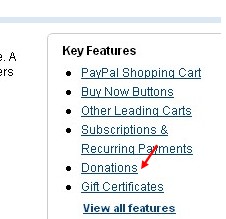
3. Scroll down the window and click "Donations" in the right sidebar
4. Enter that first field,choose a button style,scroll down the window and click on "Create a button Now"
5. Then you will see HTML code, copy it
6. Log in to your blogger account
7. Go to Design>>>Page Elements>>>Add Gadget
8. Paste the HTML code from PayPal
9. Save it

Then, how does it work? You just silent and wait untill there are people who donate to you.