Wednesday, December 8, 2010

How To Add Falling Love On Blog

Have you ever falling in love to someone? I know, most of you ever fallin in love to someone. Therefore, I will teach you how to add many falling love on your blog. How? You just follow the steps below

1. Log in to your blogger account
2. Go to Design>>>Page Elements>>>Add Gadget
3. Choose HTML/Java Script, then copy and paste the code below


4. Save it

Tuesday, December 7, 2010

How To Add Music Playlist On Blog

Are you a music lover? If you a music lover, you are very lucky today because you can get a music playlist and add this to your blog. By adding music playlist, your visitors can be happy, because thay can listening a song when they read your articles.Then, how? OK, if you don't know, just follow the steps below

1. Go to Mixpod (If you don't have Mixpod account, Sign up first)
2. Then click "Create Playlist' on the top
3. Click add button "+", then click "Save Playlist"
4. Click "SAVE (get code)
5. Copy the HTML code
6. Log in to your blogger account


7. Go to Design>>>Page Elements>>>Add Gadget
8. Paste HTML code from Mixpod
9. Save it

Monday, December 6, 2010

Easy Trick to Earn Money with PayPal Donate

Do you want to earn money with easy way? In this trick, we will use PayPal. Most of you sure know PayPal. PayPal is an e-commerce business allowing payments and money transfers to be made through the Internet. Online money transfers serve as electronic alternatives to traditional paper methods such as checks and money orders. So, how do we earn money from PayPal? We just add PayPal donate button in our blog. How? If you don't know, just follow the steps below

1. Go PayPal (If you don't have PayPal account, sign up first)
2. Click on the " Merchant Services" tab (see at the top of page)
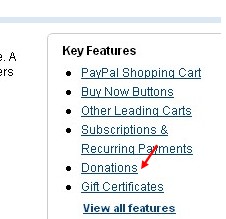
3. Scroll down the window and click "Donations" in the right sidebar
4. Enter that first field,choose a button style,scroll down the window and click on "Create a button Now"
5. Then you will see HTML code, copy it
6. Log in to your blogger account
7. Go to Design>>>Page Elements>>>Add Gadget
8. Paste the HTML code from PayPal
9. Save it

Then, how does it work? You just silent and wait untill there are people who donate to you.

Saturday, December 4, 2010

How to Add Star Ratings in Blog


All bloggers certainly want to their blog rate by all visitors, whether good or bad. Usually, they rate our blog by post a comment, that's good. But there is a simple way for visitors to rate our blog. We can use star ratings. I know, most of you know what's star ratins. So if you want to add star rating to your blog, just follow the steps below

1. Go to OutBrain
2. Customize the widget
3. Then click the blogger picture
4. Thick "I agree..."
5. Install

Top 3 Sharing And Book Marking Widgets for Blog

Social bookmarking is now a very important factor when it comes to your blog SEO, because it can give you a lot of back links, and I am sure that you want to make it easy to your visitors to share and bookmark your blog posts. So here I list the best 3 sharing and bookmarking widgets for blog users And I will describe each one and will tell you the positive and negative for each one.

Add to any for blogger
AddtoAny.com

1. More than 120 bookmarking sites
2. User Can search for a specific service
3. Allow users to send your page for a friend via email.
4. Allow users to bookmark your blog posts into their browser
5. Customizable easily.

AddThis for blogger
Addthis.com

1. Smartest sharing tool ever.
2.  Largest collection of services, and growing. 170+ services
3.  Automatically translated in over 50 languages.
4.  Customize the colors and menu
5.  Track how your users are sharing with analytics

ShareThis for blogger
ShareThis.com

1. Only 45 services
2. Customize Able
 3. English language only.
4. You can register and import your friends mail addresses to send them news easily.

Friday, December 3, 2010

How to Disable Right Click in Blog And Give a Notice

Do you know what is "Plagiarism"? Plagiarism in internet means someone that copy some or all articles in blog and another website for his blog, without include the source. This can be include to steal a copyright. You can protect your blog from plagiarism by disable the right click in your blog. How? Just follow the steps below

1. Log in to your blogger account
2. Go to Design>>>Page Elements>>>Add Gadget
3. Choose HTML/Java Script
4. Copy and paste the code below

<SCRIPT language=JavaScript>
<!-- http://www.spacegun.co.uk -->
var message = "Don't Copy"; 
function rtclickcheck(keyp){ if (navigator.appName == "Netscape" && keyp.which == 3){ alert(message); return false; } 
if (navigator.appVersion.indexOf("MSIE") != -1 && event.button == 2) { alert(message); return false; } } 
document.onmousedown = rtclickcheck;
</SCRIPT>


5. Save it

How to Add Numbered Page Navigation in Blog

The ability to 'paginate' blog has been a long requested feature. Pagination allow us to number blog pages like a book, offering readers the ability to navigate deeper into the archives with ease when compared to the 'newer' and 'older' post links. So if you want to try this page navigation, just follow the steps below. (Previously, you have to Log in to your blogger account)

1. Go to Bloggerplugins
2. Edit your Page Navigation
3. If you finish, click customize
4. Then click Add Widget To My Blog
5. Finish and save it

Thursday, December 2, 2010

How to Add Search Engine (Google Custom Search) in Blog

"With Google Custom Search, you can harness the power of Google to create a customized search experience for your own website"

That's the menaing of Google Custom Search. So, what is Google Custom Search? For more details, you can go to Google Custom Search or, you can also click this picture


Google Custom Search

Good Luck

How to Add "Save Page as PDF" Button in Post

Usually, when we are blogwalking, we found an interesting page and we have to save it in our flashdisk. But, if we direct save the page, usually page that we save isn't neat. The page will be neat if we save with PDF format. Unfortunately, "Save Page as PDF" button rarely find in many blogs. So, if you want to set "Save Page as PDF" button in your blog, just follow the steps below

1. Go to PDF Online
2. Then Sign Up with new account
3. Fill the form, then click Sign Up
4. Generate the Java Script
5. Copy the Java Script

6. Log in to your blogger account
7. Go to Design>>>Edit HTML
8. Thick Expand Widget Templates
9. Find this code : <data:post.body/>
10. Paste the Java Script unedr  <data:post.body/>
11. Save it

Wednesday, December 1, 2010

How to Change Blog Into DoFollow

What is advantege of DoFollow ? DoFollow means link that we enter when we comment on a DoFollow Blog, that will be considered as Backlink by Search Engine. Actually blogs are NoFollow. So, how to change our blog to DoFollow? It's very easy, just follow the steps below.

1. Log in to your blogger account
2. Go to Design>>>Edit HTML
3. Thick Expand Widget Templates
4. Find this code : rel='nofollow' 
5. Then delete nofollow
6. Save it

NOTE : If you want to tell to your visitor that your blog is DoFollow blog  by picture, visit this article : DoFollow Badge